


Change the Display Format of Single Citations with My NCBI PubMed® User Preferences
[Editor's Note: This feature was implemented in PubMed on July 26, 2006.]

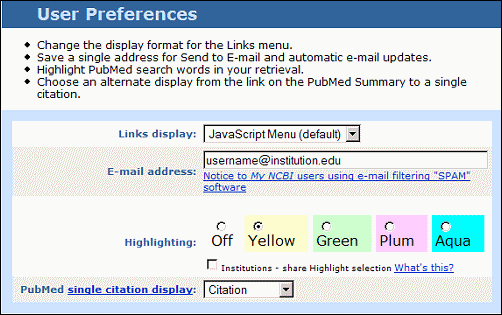
When you run a PubMed search, multiple results display in the Summary format. From there, the link on the author name(s) or the icon to the left of each citation takes you to the AbstractPlus format for that single citation. A new feature coming to My NCBI allows you to set these links to go to a different format.
The single citation display can be changed using My NCBI or by adding a URL parameter to the PubMed URL. The change also affects the display format when the retrieval is just one citation.
Activate in My NCBI
Register/Sign in to My NCBI and click on User Preferences on the My NCBI sidebar. The PubMed single citation display default is "Abstract." Choose an alternate display from the pull-down menu and click OK to activate this feature. The alternate display will only be active when you are signed into My NCBI.
[Editor's Note: A Quick Tour, Customizing PubMed's Display of Single Citations, demonstrating this feature is available from the PubMed Online Training page.]
Activate by URL Parameter
You can also change the single citation display by adding a URL parameter to the PubMed URL. The pertinent URL parameter is dr= followed by the display name.
For example, to change the default to the Citation display use:
http://www.ncbi.nlm.nih.gov/entrez/query.fcgi?dr=citation
The display will revert to the default format (Abstract) after 8 hours of inactivity when using the URL parameter.

Canese K. Change the Display Format of Single Citations with My NCBI PubMed® User Preferences. NLM Tech Bull. 2006 Jul-Aug;(351):e2.
