| |
 n an effort to promote the availability of free full text in
PubMed Central (PMC),
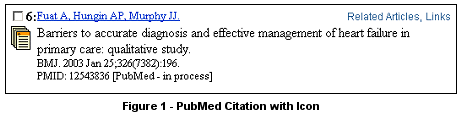
PubMed will soon display an icon next
to each PubMed citation in the Summary display. (See Figure 1.)
n an effort to promote the availability of free full text in
PubMed Central (PMC),
PubMed will soon display an icon next
to each PubMed citation in the Summary display. (See Figure 1.)
[Editor's Note: This feature was added to PubMed on March 5, 2003.]
There are three possible icons. Each will display an explanatory note,
i.e., a "mouseover," when the cursor is positioned over the icon:
| Icon |
Description |
 |
Mouseover = No Abstract.
This icon indicates the citation has neither an abstract nor a link to PMC. Clicking on the icon
displays the Abstract format (albeit without an abstract) which may display a link to
another source for the full text of the article. |
 |
Mouseover = Abstract. This icon indicates the
citation has an abstract, but not a link to PMC. Clicking on the icon displays the Abstract format
which may display a link to another source for the full text of the article. |

|
Mouseover = Free in PMC. This icon indicates
there may or may not be an abstract (if not, the citation will display "No abstract available.")
but full text for this article is available free at PMC. Clicking on the icon displays the
Abstract format with the red icon, "PubMed Central: access FREE full text articles." Use this
link to go to the full text. To go directly to the full text from the Summary page,
use the Links menu to select, "Free in PMC." |
Note: Links from author names will continue to display the Abstract format for a citation.
By Annette M. Nahin
MEDLARS Management Section

Nahin AM. PubMed's ®Summary Display to Include Icons. NLM Tech Bull. 2003 Jan-Feb;(330):e9.
| |


