| |
 n January 21, 2003, NLM implemented the Web Authorities feature in LocatorPlus, NLM's online public access catalog, making its
authority records accessible to library users worldwide. This new feature allows users to
search and browse the name authority records established in NLM's internal authority file,
reinstating a capability that has not been available since 1995 when the Name Authority File
(NAF) was removed from the MEDLARS system. The Medical Subject Headings (MeSH) terms and
term/subheading combinations used in cataloging at NLM are also now accessible in LocatorPlus
1.
Of particular interest to librarians, this feature also provides the capability for display
and download of NLM authority records, including those for subjects, in a modified MARC 21 authority format.
n January 21, 2003, NLM implemented the Web Authorities feature in LocatorPlus, NLM's online public access catalog, making its
authority records accessible to library users worldwide. This new feature allows users to
search and browse the name authority records established in NLM's internal authority file,
reinstating a capability that has not been available since 1995 when the Name Authority File
(NAF) was removed from the MEDLARS system. The Medical Subject Headings (MeSH) terms and
term/subheading combinations used in cataloging at NLM are also now accessible in LocatorPlus
1.
Of particular interest to librarians, this feature also provides the capability for display
and download of NLM authority records, including those for subjects, in a modified MARC 21 authority format.
Types of Authority Headings Available
Users now have the ability to search and browse over 1,175,000 authority records
2, including:
- Approximately 510,000 subject authority records structured as MARC 21 authority records
(including subject terms and subject term/topical subheading combinations and names and titles
used as subjects)
- More than 625,000 name authority records (approximately 450,000 personal, 125,000 corporate, 45,000
meeting, and 5,000 geographic names)
- Approximately 40,000 series and uniform title authority records
- Approximately 800 name/title authority records
Associated references and scope notes are also provided.
Limitations of Web Authorities
This release does not include:
- Z39.50 functionality
- Full MARC 21 character set for display and download of authority data
- Use of diacritics in searches (ignore the diacritic mark and use the plain letter in searching)
- Keyword searching of authority data
How to Search for Authority Data in LocatorPlus
Use one of the following search indexes available in the "Search In" box:
- Browse MARC Subject Authority -use to search for MeSH terms and subject/topical combinations
- Browse MARC Name Authority -use to search for personal, corporate, or meeting names
- Browse MARC Title Authority - use to search for series and uniform title headings
- Browse MARC Name/Title Authority - use to search for name headings associated with titles
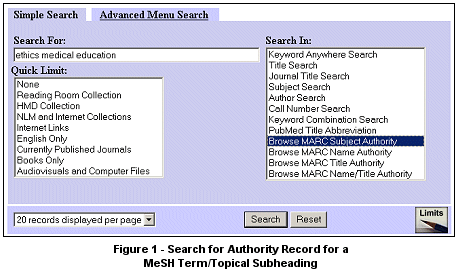
For example, to search the MeSH subject heading "Ethics, medical" with the topical subheading of
"education", input the string without punctuation in the search box and highlight the choice "Browse MARC Subject Authority"
in the Search In box as shown in Figure 1.
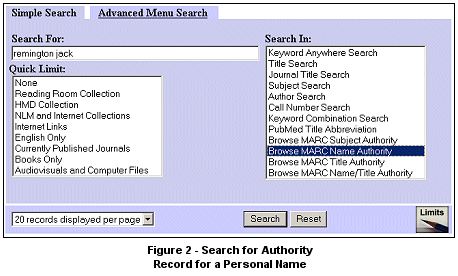
To search for an authority record of an individual, input the string without any punctuation as
"last name first name" in the search box and highlight the choice "Browse MARC Name Authority" in
the Search In box as shown in Figure 2.
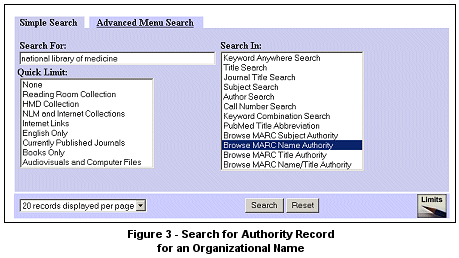
To search for an authority record for an organization, input the string without punctuation in
the search box and highlight the choice "Browse MARC Name Authority" in the Search In box as shown
in Figure 3.
Headings List Display
All initial search results are presented as a "Headings List" - an alphabetical list of all
headings found in LocatorPlus that fall nearest alphabetically to the
first words used in the search, whether the headings have authority records associated with them or not.
Important
Authority records are available only for those headings in the list that display with
one of the icons
below in the leftmost column of Table 1.
| Icon |
Description |
 |
Clicking this icon leads to a display of the authority record;
authority records identified with this icon contain no notes or references. |
 |
Clicking on this icon leads to a display of
references to the authority record. |

|
Clicking on this icon leads to a display of
the authority record and scope note. |
 |
Clicking on this icon leads to a display of
the authority record, references, and scope note. |
Table 1 - Icons Indicating Availability of Authority Information
Note: LocatorPlus includes all types of bibliographic records, cataloged as well as
uncataloged (e.g., on order, regional holdings, collaborating producer records). See "What kinds of bibliographic
records will I find in NLM LocatorPlus?" at http://www.nlm.nih.gov/services/cat_bibrectype.html. This is the reason that the "Headings List" in a search may
include many headings that do not have associated authority records.
For example, the retrieval for the subject search "Ethics Nursing" displays as shown in Figure 4.
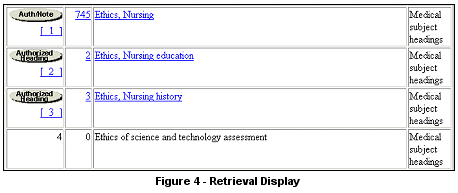
Note that clickable icons leading to authority records appear in the left hand column only for the
first three items on the list. The last item in the figure appears in the list because it represents
a series/uniform title heading that is coded as being also appropriate for use as a subject heading.
To retrieve the actual authority record for this series/uniform title, it must be searched again using
the selection "Browse MARC Title Authority"; in the retrieval for this second search, this string appears
with the authority icon "References" in the left hand column.
Display and Download of Authority Records in MARC 21 Authority Format
- Locate and mark the authority record of interest.
- At the bottom of the display labeled "SAVE OPTIONS", select the download format.
Click on the drop-down menu, which shows the default setting of "Full Record with holdings", to change
the selection to the MARC 21 format desired. The options are:
Latin1 MARC -- which provides a MARC-formatted record utilizing the ASCII character set, including the "common"
diacritics that often occur in languages that employ the "Latin" alphabet;
or
Raw MARC -- which provides a MARC-formatted record inclusive of special characters.
- Then, click on the "Print/Save" icon which appears to the right of the drop-down box.
- At that point, click on "File/Save As" in the Menu Bar of the browser. Then indicate a
file name in the appropriate box depending on the browser, specifying where in your local
environment you wish to save the records. If using Internet Explorer 5.50, change the
"Save as Type" box to "Text File" before saving.
- As the final step, use the MARC record import functionality of your local integrated library
system to load the records into your local database.
Further Information and Comments
For further information regarding the authority records in LocatorPlus, see the documentation
posted under "Cataloging Databases, Publications, and Products" on the NLM Cataloging Web site at
http://www.nlm.nih.gov/tsd/cataloging/nlmauthrecsfile/nlmauthrec.html.
Comments or questions regarding this feature in LocatorPlus should be directed to
custserv@nlm.nih.gov.
1 The MeSH Browser, available online at
http://www.nlm.nih.gov/mesh/MBrowser.html,
is the authoritative source for NLM controlled vocabulary and provides access to the hierarchical
arrangement of MeSH. The subject authority records in LocatorPlus are structured for use in the
creation and maintenance of bibliographic records.
2 These numbers are dynamic as new
authority records are added to
the database in real time as materials are cataloged.
By Alice E. Jacobs
Cataloging Section

Jacobs AE. NLM Authority Records Accessible in LocatorPlus. NLM Tech Bull. 2003 Jan-Feb;(330):e4.
| |


