

| ||
| June 24, 2005 [posted] July 12, 2005 [section added] July 22, 2005 [note added] | ||
| PubMed® Search Terms Highlighted | ||
|
[Editor's Note: This feature was implemented in PubMed on July 19, 2005.]
Highlighted terms will include your search terms as well as terms that have been added by PubMed to enhance your search. For example, a search of cancer translates to include the term neoplasms. Use the Details tab to see how a search has been translated (see Figure 2). PubMed will also highlight words or phrases retrieved by a truncated term. 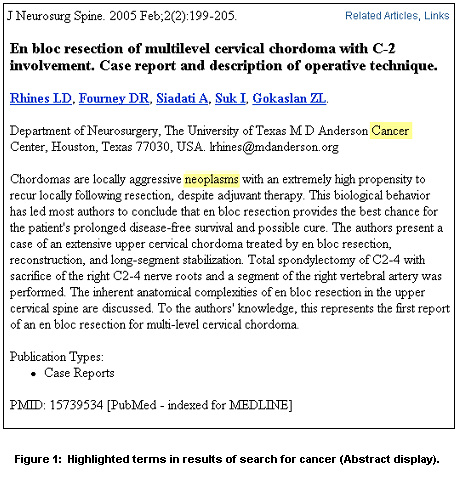
Highlighting will appear in any field, not just fields included in the search. For example, in Figure 1, notice that Cancer is highlighted in the affiliation field even though this field was not included in the search (see Figure 2). Please keep in mind that some terms, while searchable, do not display on the Summary, Abstract, or Citation formats, (e.g., the Publication Type, Journal Article). Also, terms searched as a phrase will be highlighted as the phrase. 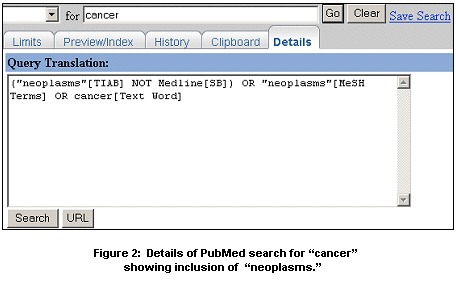
Terms that appear only as MeSH headings on a record will be highlighted in the Citation format. Note, however, if a search includes a broad MeSH term, indented terms included by the automatic explosion feature will not be highlighted. Highlighting in search results is also available in the Entrez Books database. [This section was added on July 12, 2005.] 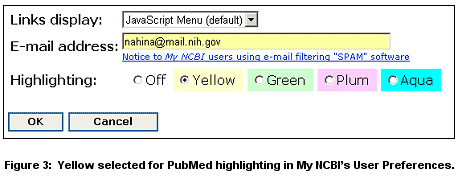
Color Change for Links
By Annette M. Nahin 
Nahin AM. PubMed® Search Terms Highlighted. NLM Tech Bull. 2005 May-Jun;(344):e14. | ||
 highlighting feature will soon be implemented in PubMed to help users quickly find where their search terms appear in their search results. Search terms will be highlighted in pale yellow in the Summary, Abstract, and Citation display formats (see