[Editor's Note: PubMed Help was added to the Bookshelf on July 7, 2005.]
 he National Center for Biotechnology Information (NCBI) has added the PubMed Help to the Bookshelf. The enhanced PubMed Help on the Bookshelf will replace the online Help available from the PubMed sidebar.
Table of Contents
The table of contents was rewritten to be more descriptive and provide users with an easy, quick way to find answers to their help questions (see Figure 1).
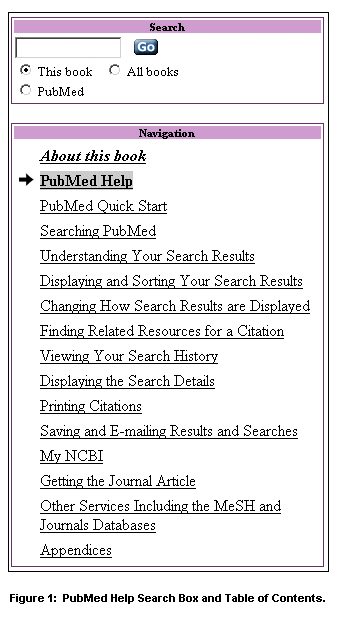
Search
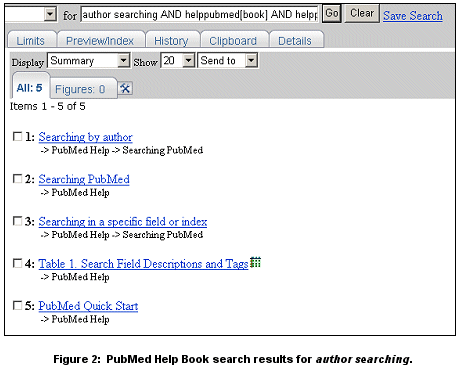
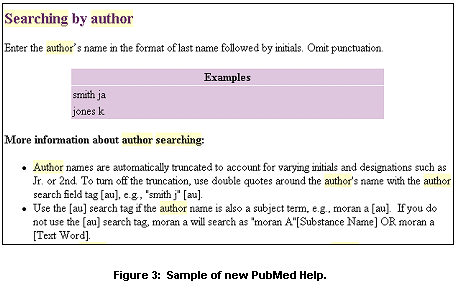
The PubMed Help on the Bookshelf can be searched directly using any search term or phrase to find information. You have the option of exclusively searching the PubMed Help (the default) or searching all the Bookshelf books. The results of your search will be a list of book sections (see Figure 2). Link to the section(s) of interest to you (see Figure 3).
PubMed Quick Start
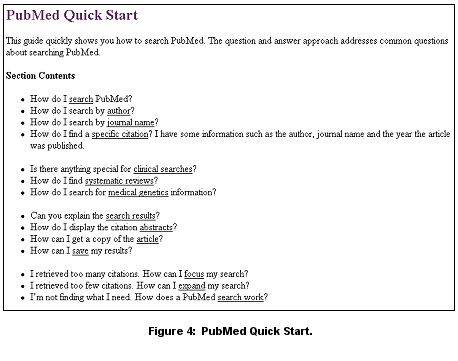
The Help was redesigned to provide a more logical order than the former Help and a PubMed Quick Start was added (see Figure 4). The Quick Start is a brief overview of basic PubMed search features.
The PubMed Help includes several new sections in addition to the Quick Start:
- The section "Saving and E-mailing Results and Searches," consolidates instructions that were previously separated into different parts of the help.
- The section "Getting the Journal Article" outlines the options for locating a journal article's full-text.
Instructional Graphics
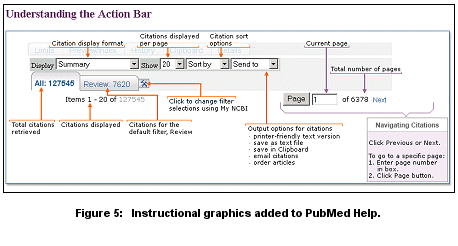
Instructional graphics were added (see Figure 5 for an example from the "Displaying and Sorting Your Search Results" section).
PDF Version
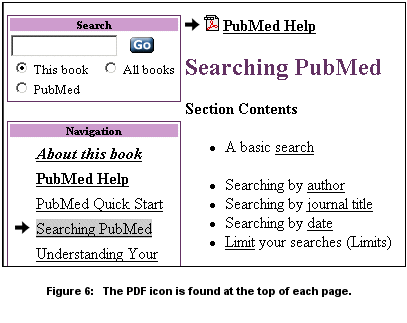
There is a PDF version of this book, which includes the entire book's content. Click on the PDF icon found on the top of each page (see Figure 6).
The existing PubMed Help will remain available initially while we introduce PubMed Help on the NCBI Bookshelf.
By Kathi Canese
National Center for Biotechnology Information (NCBI)

Canese K. PubMed® Help Added to NCBI Bookshelf. NLM Tech Bull. 2005 May-Jun;(344):e16.
| 

