 wo PubMed functions and
an optional change for the Links menu have changed. The following descriptions
explain how these work.
wo PubMed functions and
an optional change for the Links menu have changed. The following descriptions
explain how these work.
Page Selection:
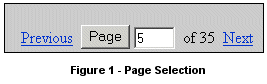
The new Select Page function uses links for Previous and Next page display. To move to a non-adjacent page, enter the
desired page number and then press the Page button to move there. (See Figure 1.)
Send to:
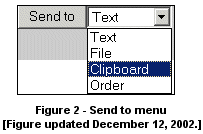
The Order, Clip Add/Clip Remove, Text, and Save buttons have been replaced by selections
under a new "Send to" menu. (See Figure 2.) The File function replaces Save and continues to
create a file of citations in text format. Unless individual records are
selected, the Text and Order selections continue to process only those
records displayed on the page, whereas the Clipboard and File selections
process all resulting records (see Help, re: the limits for these). After making your selection on the menu, click on Send to.
Links:
The current/default version of PubMed's Links feature, a pull-down menu, uses Javascript which causes problems for some browsers.
A change to PubMed's URL makes it possible to alter the way the Links feature is displayed.
There is more than one option including one that does not use Javascript. The change is invoked by adding one
of the following to the end of PubMed's URL:(http://www.ncbi.nlm.nih.gov/entrez/query.fcgi):
Options:
?linkbar=plain: Displays links as separate selections. Does not use Javascript.
?linkbar=popup: Opens a small window with link selections
?linkbar=menu: Links display as menu.
Example using the "plain" option that does not use Javascript:
http://www.ncbi.nlm.nih.gov/entrez/query.fcgi?linkbar=plain
Please note:
- If you have Javascript enabled on your browser and it is not causing problems, it is not necessary to change unless you prefer one of the new formats.
- Other PubMed functions may utilize Javascript so it is advised that Javascript be enabled on your browser.
- This cannot be used with the alias URL of pubmed.gov.
- Users who prefer to always use a non-default Links menu may want to bookmark the new altered URL.
By Annette M. Nahin
MEDLARS Management Section

Nahin AM. Page Selection, Send to, and Links: Changes to PubMed®. NLM Tech Bull. 2002 Nov-Dec;(329):e7.
| 

