




This is a preview of updates coming to the Technical Bulletin's website in April 2026. Return to current site.
Read more about the modernization release schedule in this announcement.
Comment via the yellow feedback button in the lower right hand corner of the page. Contact the NLM Help Desk with any questions or concerns.
This is archived content.
Links may have become inactive over time. Visit Archive-It to find the original published layout.
New App Serves as Guide to NLM Mobile
Heiland-Luedtke J, Antani SK, and Potvin DJ. New App Serves as Guide to NLM Mobile. NLM Tech Bull. 2012 Jul-Aug;(387):e3.
July 23, 2012 [posted]
The National Library of Medicine (NLM) has released a new mobile app that is intended to serve as the authoritative guide to NLM mobile resources. This app will improve your ability to find and use NLM mobile apps and sites.
The app was created as an HTML 5 mobile Web site in support of the Library’s ongoing efforts to make our information broadly available. Support for HTML 5 is available in Web browsers on many mobile devices. Information on all NLM mobile resources will be available through this app. To explore the app, visit //www.nlm.nih.gov/mobile-app/ on a mobile device such as an iPhone, iPad, Android smart phone, Blackberry, or Microsoft phone.
In the app, users can find NLM Mobile resources by (see Figure 1):
- Type: Web site vs. Application
- Device: Android, Apple iOS, or Blackberry
- Tags: Descriptive tags assigned by NLM used to categorize the resource (e.g., Drugs or Disasters)
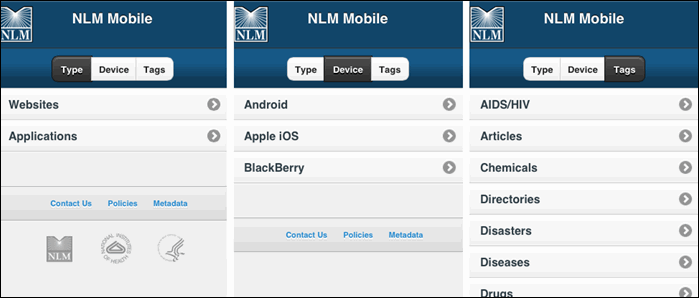
Figure 1: Browse by Type, Device, or Tags.
Each mobile resource will be represented by an entry which includes (see Figure 2):
- Brief description
- Descriptive tag(s)
- Image
- Link to install App or launch Web site
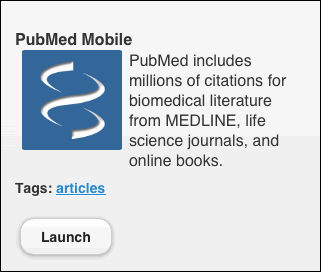
Figure 2: Entry for PubMed Mobile.
Users can save the app to their home screen for those times when they have no wireless connection or cell signal. The index of NLM mobile resources is available for offline browsing. The app will be updated with the latest information once the device is re-connected to the Internet.
We welcome your feedback about this new app at Contact NLM or via the Contact Us link in the footer of the app.
By Jenny Heiland-Luedtke, Sameer K. Antani, and Donald J. Potvin