




This is a preview of updates coming to the Technical Bulletin's website in April 2026. Return to current site.
Read more about the modernization release schedule in this announcement.
Comment via the yellow feedback button in the lower right hand corner of the page. Contact the NLM Help Desk with any questions or concerns.
This is archived content.
Links may have become inactive over time. Visit Archive-It to find the original published layout.
Shared Settings in My NCBI
Frost E. Shared Settings in My NCBI. NLM Tech Bull. 2009 Jan-Feb;(366):e5.
January 26, 2009 [posted]
February 05, 2009
[correction]
My NCBI provides the ability for multiple users to share settings for several features. Sharing Settings may be useful for libraries to direct patrons to their local services for Entrez database search results. As an example, a library participating in LinkOut® could select a filter for its holdings information.
Previously, it was necessary for users to click an "Institutions — share feature selection" check box at the top of the Filter, Document Delivery Service, Highlighting, and Outside Tool setting pages. The "Institutions — share feature selection" check box was removed and users instead need to go to the Shared Settings page to select which settings to share. The method of setting-up the different settings remains the same.
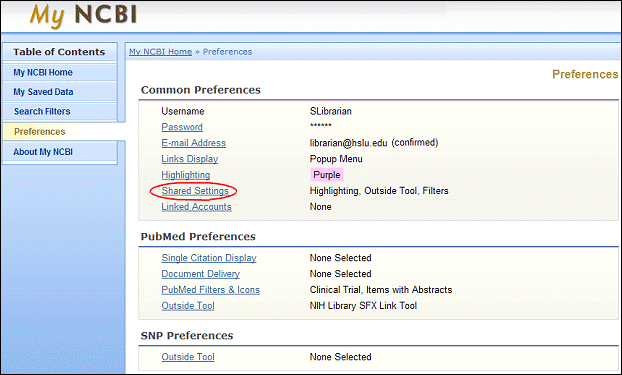
The Shared Settings page is linked from the Preferences page in My NCBI (see Figure 1).
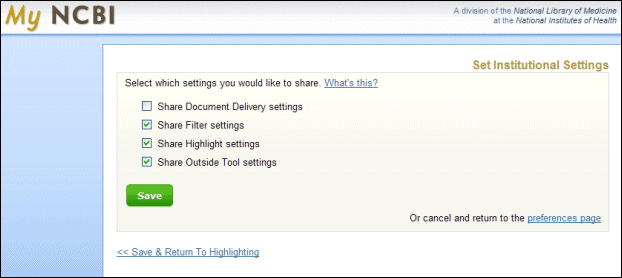
The new Shared Settings page has check boxes for each feature that can be shared. Users can easily select which settings to share by clicking the appropriate box (see Figure 2). Only those settings for a feature where the box is checked will be shared.
[Editor's note: The URL in this section was corrected on February 5, 2009.]
Once the features have been selected, the next step is to create a URL using the following format:
- http://www.ncbi.nlm.nih.gov/sites/entrez?myncbishare=username
where username is the shared My NCBI account username.
This URL can then be used to create a link or button for PubMed® on a library's Web site, and also sent to patrons to bookmark in their browsers.
Note: The Institutions/Shared Settings for existing My NCBI accounts will be automatically retained.
For more information about Shared Settings, please see the PubMed [link removed] Help.