




This is a preview of updates coming to the Technical Bulletin's website in April 2026. Return to current site.
Read more about the modernization release schedule in this announcement.
Comment via the yellow feedback button in the lower right hand corner of the page. Contact the NLM Help Desk with any questions or concerns.
This is archived content.
Links may have become inactive over time. Visit Archive-It to find the original published layout.
Easy E-mailing of Large Search Results Restored in PubMed®
Nahin AM. Easy E-mailing of Large Search Results Restored in PubMed®. NLM Tech Bull. 2010 Jan-Feb;(372):e11.
February 02, 2010 [posted]
February 05, 2010
[Editor's note added]
[Editor's note: These changes were implemented in PubMed on February 2, 2010.]
Many PubMed users will be happy to learn that the option to e-mail search results in batches is back. The "Start from citation" field has been added to the PubMed Send to E-mail screen (see Figure 1).
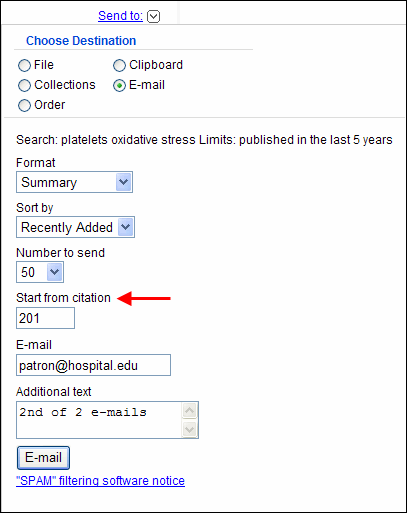
Example: You want to send the results of a search, 246 PubMed records, to a patron or colleague. There will be two e-mails. Send the first e-mail with Number to send set for 200 (the maximum per e-mail) and Start from citation set for 1 (the default). Send a second e-mail, using the same search results, with Number to send set for 50 (to cover the remaining 46) and enter 201 in the Start from citation box.
Enter notes in the Additional text box that will help the recipient, such as your name or e-mail address and the number of e-mails to expect.