




This is a preview of updates coming to the Technical Bulletin's website in April 2026. Return to current site.
Read more about the modernization release schedule in this announcement.
Comment via the yellow feedback button in the lower right hand corner of the page. Contact the NLM Help Desk with any questions or concerns.
This is archived content.
Links may have become inactive over time. Visit Archive-It to find the original published layout.
Enhanced MeSH® Browser
Johnston D. Enhanced MeSH® Browser. NLM Tech Bull. 2007 Nov-Dec; (359):e8.
November 27, 2007 [posted]
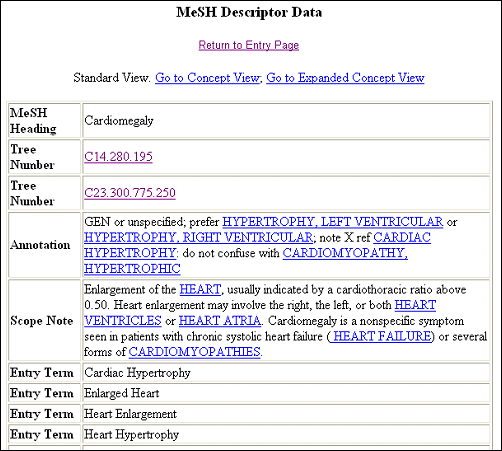
A new feature has been added to the Descriptor display in the MeSH Browser. Since June 2007, you have the additional option of viewing the "Concept View" (see Figure 1) of the record as it exists in XML MeSH (see files available to download.)
The concept structure view groups synonymous terms into concepts. For example, the terms "Cardiomegaly" and "Enlarged Heart" are synonymous and so belong in the same concept (see Figure 2). Every Descriptor record has at least one concept and every concept has at least one term. For further information see Concept Structure in XML MeSH.
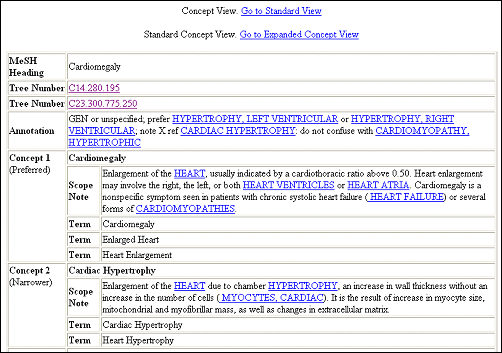
The "Standard" Concept View provides the minimum concept structure, with terms and scope notes. The "Expanded" Concept View provides additional concept and term attributes, such as Concept UI, Semantic Type, and Lexical Tag. Definitions of these attributes are given in the list of XML MeSH Data Elements, where the "MeSH Browser" label is given for every applicable element.