




This is a preview of updates coming to the Technical Bulletin's website in April 2026. Return to current site.
Read more about the modernization release schedule in this announcement.
Comment via the yellow feedback button in the lower right hand corner of the page. Contact the NLM Help Desk with any questions or concerns.
This is archived content.
Links may have become inactive over time. Visit Archive-It to find the original published layout.
New Look, New Collections for IndexCat Database
DuQuette, LA. New Look, New Collections for IndexCat Database. NLM Tech Bull. 2012 May-Jun;(386):e5.
May 22, 2012 [posted]
The History of Medicine Division (HMD) of the National Library of Medicine (NLM) announces the launch of a new user interface for its premier database, IndexCat, along with the addition of two new collections involving medieval scientific English and Latin texts.
Utilizing software developed by Ex Libris, Inc., the new IndexCat interface offers improved viewing capabilities and new layouts for search results and record displays. IndexCat is available free of charge.
New Homepage
IndexCat has a new homepage with these major sections (see Figure 1):
- About
- Index-Catalogue
- IndexCat Database
- eTK/eVK2 Collection
- Project Histories
- IndexCat
- eTK/eVK2
- FAQs (Frequently Asked Questions)
A SEARCH button at the top right corner takes you to the IndexCat Database Search page. The page also links to other HMD and NLM resources.
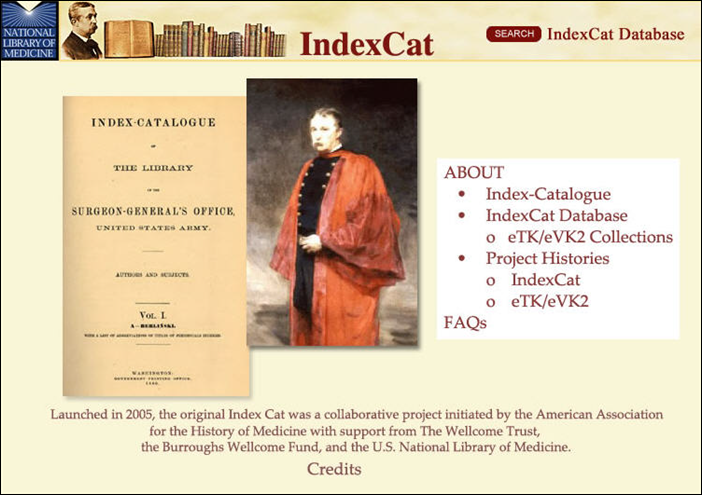
Figure 1: The IndexCat Homepage
New Collections
The two new collections are an NLM-supported project undertaken in conjunction with the University of Missouri-Kansas City. These seminal, historical collections are developed from the enriched electronic database of A Catalogue of Incipits of Mediaeval Scientific Writings in Latin (rev.) by Lynn Thorndike and Pearl Kibre (eTK) and the updated and expanded version of Scientific Writings in Old and Middle English: An Electronic Reference (eVK2) edited by Linda Ehrsam Voigts and Patricia Deery Kurtz (see Figure 2). Opening a new frontier in historical research, these resources encompass over 42,000 records of incipits, or the beginning words of a medieval manuscript or early printed book. IndexCat users can search incipit data by manuscript, library, author/translator, title, subject, date and other information. See eTK/eVK2 Project for more information.
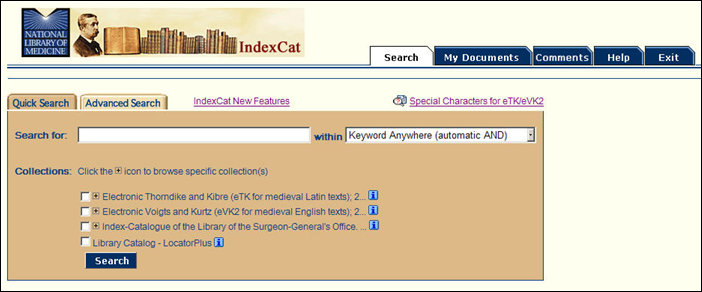
Figure 2: Collections on Quick Search Page.
Search Page Changes
Quick Search Tab
There now are additional search categories on the Quick Search tab (see Figure 3):
- Keyword Anywhere (automatic AND)
- Keyword Anywhere Search
- Author Search
- Date Search
- ID Number Search
- Item Type Search (Index-Catalogue only)
- Language Search (eVK2 only)
- Subject Search
- Title/Journal Title Search
The same categories are also offered on the Advanced Search tab.
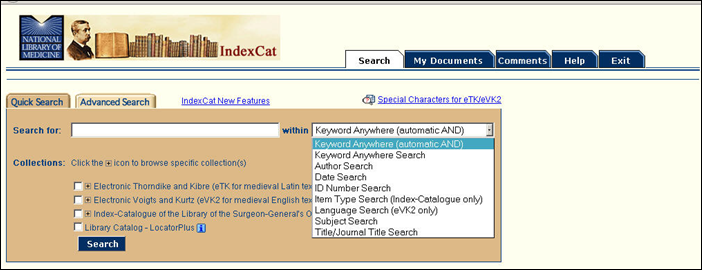
Figure 3: Search Category Options on Quick Search.
My Documents Tab
You now have the ability to select multiple records from the Results Display page after a search to save to the My Documents page (see Figure 4).
You can save a maximum of 100 records to the My Documents page.
Using the My Documents page, you can select multiple items to print, download, or e-mail.
The My Documents records list is cumulative up to 100 records unless you remove items. You can add records from different searches during the same IndexCat access session. IndexCat does not retain your saved records if you exit or disconnect.
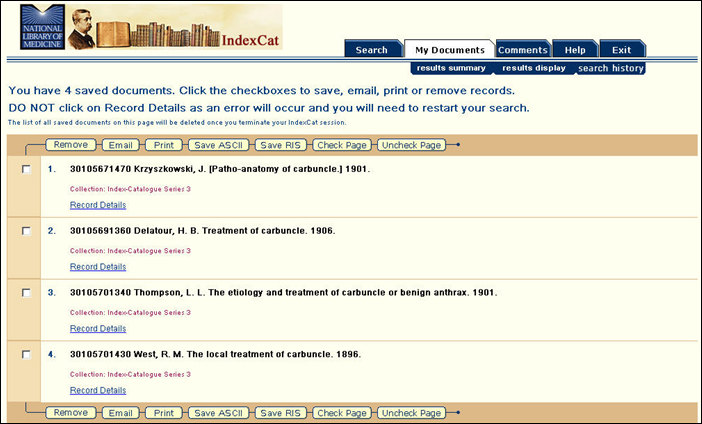
Figure 4: My Documents Page.
Special Characters for eTK/eVK2
The [link removed] Special Characters for eTK/eVK2 page provides assistance with searching for terms that contain special characters in the eTK/eVK2 collections.
Index-Catalogue Corrections
Corrections made to the Index-Catalogue records include:
- edits to punctuation
- corrections to 'See Also' in Subject fields
- the addition of – daggers to identify Cases/Case Reports in Series 1, [Case Reports] to the Title field in Series 1, and asterisks to identify dissertations in Series 2.
New FAQs and Help Pages
There are a number of new and revised FAQs and Help pages for IndexCat.
We welcome your feedback via the [link removed] Comments tab at the top of every page.