
U.S. flag

An official website of the United States government

Here’s how you know

Official websites use .gov
A .gov website belongs to an official government organization in the United States.

Secure .gov websites use HTTPS
A lock ( ) or https:// means you’ve safely connected to the .gov website. Share sensitive information only on official, secure websites.

The modernized Technical Bulletin website is here!
Read more about the modernization release schedule in this announcement. Contact the NLM Help Desk with any questions or concerns.
Return to old site

This is archived content.

Links may have become inactive over time. Visit Archive-It   to find the original published layout.

Non-English Language Article Titles Now Display in PubMed When an English Translation is Not Available

Majewski K. Non-English Language Article Titles Now Display in PubMed When an English Translation is Not Available. NLM Tech Bull. 2015 Sep-Oct;(406):e1.

September 02, 2015 [posted]

English translations of article titles in other languages display in PubMed whenever they are available. In the past, when a translation was not available, the title display in PubMed would read "Not available" or similar wording (see Figure 1).
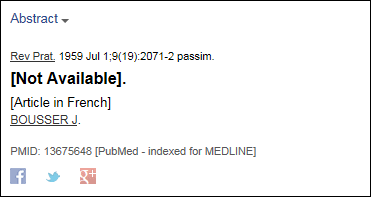

Previous citation display for a non-English full text article for which an English translation for the article title is not available.
Figure 1: Previous citation display for a non-English full text article for which an English translation for the article title is not available.

PubMed has been updated to display the title in the original language when a translation is not available (see Figure 2).
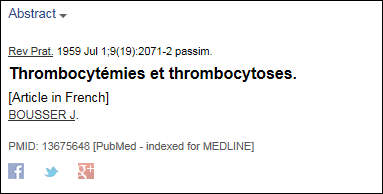

New citation display for a non-English full text article for which an English translation for the article title is not available.
Figure 2: New citation display for a non-English full text article for which an English translation for the article title is not available.

Note that this change does not affect PubMed searching. The default title search includes only English titles and title translations. To search titles in the original language, select the "Transliterated Title" field that includes both transliterated and vernacular titles from the Advanced Search page or use the field tag [tt] (see Figure 3).


Transliterated/Vernacular Title field tag [tt].
Figure 3: Transliterated/Vernacular Title field tag [tt].