U.S. flag

An official website of the United States government

Here’s how you know

Official websites use .gov
A .gov website belongs to an official government organization in the United States.

Secure .gov websites use HTTPS
A lock ( ) or https:// means you’ve safely connected to the .gov website. Share sensitive information only on official, secure websites.

This is archived content.

Links may have become inactive over time. Visit Archive-It   to find the original published layout.

Hands On

Hands On. NLM Tech Bull. 1999 Nov-Dec;(311):e7.

November 1999 [posted]

Hands On

The Hands On column in this issue is highlighting PubMed's informative online Help (http://www.ncbi.nlm.nih.gov:80/entrez/query/static/help/pmhelp.html) and PubMed's FAQs (http://www.ncbi.nlm.nih.gov:80/entrez/query/static/faq.html). Both are available as links from the PubMed sidebar. Answering your own question can be as easy as "click, scroll, click." Next time you have a question, give these resources a try.

Question:
Why is "AND notpubref [sb]" included in the search strategy in the PubMed Query box?

Answer:
The answer is found in PubMed's FAQs under "Why does the Details of my search show "AND notpubref [sb]" in every search?" at http://www.ncbi.nlm.nih.gov:80/entrez/query/static/faq.html#Pubref. See also the article in this issue about the expanded scope (http://www.nlm.nih.gov/pubs/techbull/nd99/nd99_scope.html) of PubMed and MEDLINE.

Question:
How can I tell if my browser accepts cookies?

Answer:
This answer is also found in PubMed's FAQs under "How can I tell if my browser accepts cookies?" at http://www.ncbi.nlm.nih.gov:80/entrez/query/static/faq.html #Acceptscookies. See also the PubMed FAQ, What is a "cookie?" at http://www.ncbi.nlm.nih.gov:80/entrez/query/static/faq.html#Cookie.

Question:
What happens when I enter unqualified terms in the new version of PubMed?

Answer:
The Automatic Term Mapping feature has not changed in the new PubMed; it is described in PubMed's Help section on Automatic Term Mapping at http://www.ncbi.nlm.nih.gov:80/entrez/query/static/help/pmhelp.html #AutomaticTermMapping. PubMed still compares terms against four Translation Tables:

  1. MeSH
  2. Journal
  3. Phrase List
  4. Author

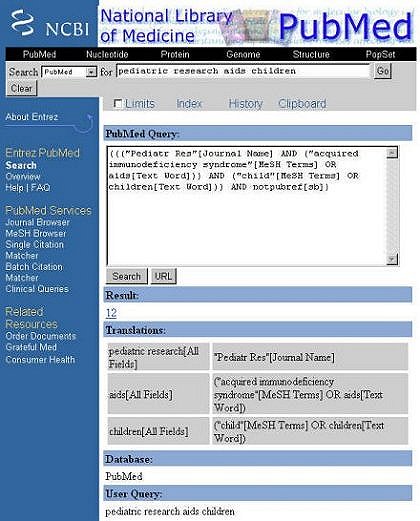
For example, if you enter pediatric research aids children in the query box, PubMed first checks to see if the entire string matches in any of the Translation Tables. If not, PubMed breaks apart this long phrase from right to left using the Automatic Term Mapping Process (see Figure 1).

Figure 1 - Query "pediatric research aids children"

Searches for:If:Action:
pediatric research aids childrenno matchremoves term on right - re-runs automatic term mapping process
pediatric research aidsno matchremoves term on right - re-runs automatic term mapping
pediatric researchmatch found in Journal Tablepediatric research will be searched as "Pediatr Res"[Journal Name]
aids childrenno matchremoves term on right - re-runs automatic term mapping
aidsmatch found in MeSH Translation Tableaids searches as "acquired immunodeficiency syndrome"[MeSH Terms] OR aids[Text Word]
childrenmatch found in MeSH Translation Tablechildren searched as "child"[MeSH Terms] OR children[Text Word]

For searches that find no matches from the right-to-left process, PubMed starts the Automatic Term Mapping process over from left-to-right. Remaining terms with no match in any of the Translation Tables are searched in All Fields and then ANDed together.

Once you have executed your search and the results are displayed, click the Details button to see PubMed's search strategy. In particular, notice the Translations area of Details where the mappings are clearly explained (see Figure 2).

Figure 2 - Details for "pediatric research aids children" Search
Details for pediatric research aids children search
--prepared by Nadine Benton
MEDLARS Management Section