

Table of Contents: 2020 JANUARY–FEBRUARY No. 432
The New PubMed Updated: Items Per Page, Sort Options, See All Similar Articles, and More. NLM Tech Bull. 2020 Jan-Feb;(432):e1.
Several features have been updated in the new PubMed, including options to customize the number of items per page, sort by publication date, reverse sort order, see all similar articles, and download the Results by Year timeline.
The National Library of Medicine (NLM) is continuing to develop features in the new PubMed site, and this new version of PubMed will eventually replace the legacy PubMed. See The New PubMed is Here for more information.
Sort by Publication Date and Reverse Sort Order
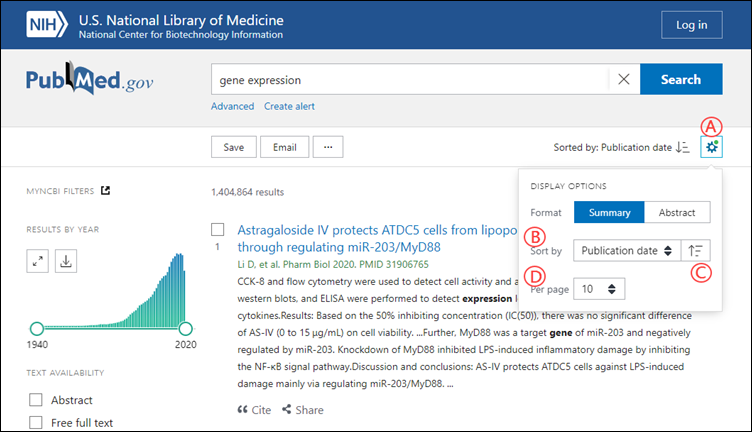
Use the Display Options menu (located under the gear button) to change how results are sorted (see A in Figure 1). Sort options now include Publication Date in addition to Most Recent and Best Match (see B in Figure 1). When sorting by Publication Date or Most Recent, use the ascending/descending button to show the newest or oldest results first (see C in Figure 1). See "Sorting your results" in the PubMed User Guide for more information.
Customize number of items displayed per page
You can also use the Display Options menu to change the number of citations displayed per page (see D in Figure 1):
See "Showing more results" in the PubMed User Guide for more information.
Persistent display preferences
Changes to display preferences such as sort by, items per page, and filters will be active for subsequent searches until browser data and cookies are cleared. Display format defaults to Summary for each new search. See "Enable Cookies" in Browser Advice for NCBI Web Pages for more information.
Similar articles
You can now view and refine the complete set of similar articles for a citation. Use the "See all similar articles" link on a citation's abstract page to display the similar articles as a new page of results. See "Similar articles" in the PubMed User Guide for more information.
Download Results by Year Timeline
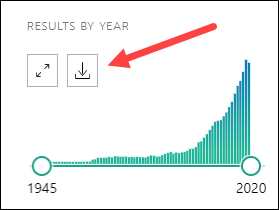
Use the download button to create a CSV file of the Results by Year timeline (see Figure 2). For more information about the Results by Year timeline, see "Searching by date" in the PubMed User Guide.
NLM will continue adding features and improving the user experience, ensuring that PubMed remains a trusted and accessible source of biomedical literature today and in the future.
For more details on the features in the new PubMed, view the recorded webinar, "A New PubMed: Highlights for Information Professionals."
See also:
The New PubMed Updated: Homepage, User Guide, My NCBI Alerts and Collections, and More
PubMed Labs Update: Using Filters
PubMed Labs Update: Library LinkOut using Outside Tool
PubMed Labs Update: Add Citations to the Clipboard
PubMed Labs Update: Advanced Search, History, and Search Details
An Updated PubMed Is on Its Way
By
Jessica Chan
National Center for Biotechnology Information


